Multi-Location Event Management: QR Code Check-In for Multiple Venues

Running events across multiple locations creates management chaos: separate check-in systems for each venue, no centralized attendance tracking, confusion about which attendees are going to which location. Whether you're organizing a conference tour across three cities, a music festival with five stages, a corporate training series at regional offices, or a recurring workshop at different community centers, managing registration and check-in across multiple venues shouldn't require multiple systems.
QR Sage solves multi-location event management by letting you create one event registration system with location selection built in. Attendees choose their preferred venue during registration, receive a unique QR code, and check in at their selected location. You get centralized registration management with location-specific attendance tracking and reporting. This step-by-step guide shows you how to set up multi-venue event ticketing with QR code check-in, customize registration forms, and track attendance by location—all from a single event ticketing platform.
Use Cases for Multi-Location Event Management
Multi-location event ticketing platforms are essential for:
- Conference tours: Running the same conference in New York, Chicago, Los Angeles, and Miami with one registration system
- Multi-venue festivals: Music festivals, food festivals, or art fairs with multiple stages or venues where attendees can access different areas
- Corporate training series: Employee training or workshops held at regional offices (West Coast, East Coast, Midwest, South) where employees register for their nearest location
- Recurring workshop series: Monthly or weekly workshops held at different community centers, coworking spaces, or libraries where participants choose their preferred venue
- Multi-track conferences: Large conferences with breakout sessions in different rooms or buildings where attendees need location-specific tickets
- Franchise or chain events: Grand openings, promotional events, or customer appreciation events across multiple store locations
How to Set Up Multi-Location Event Registration
Follow these 6 steps to create a multi-venue event ticketing system with QR Sage:
Step 1: Upload Your Event Branding
In the Project Details page, upload your event logo or brand image. This logo appears on all registration forms, email confirmations, and QR code tickets regardless of which location attendees choose. Consistent branding across all venues creates a professional, unified event experience even when you're running the same event in multiple cities or venues.
Step 2: Add Location Selection to Your Registration Form
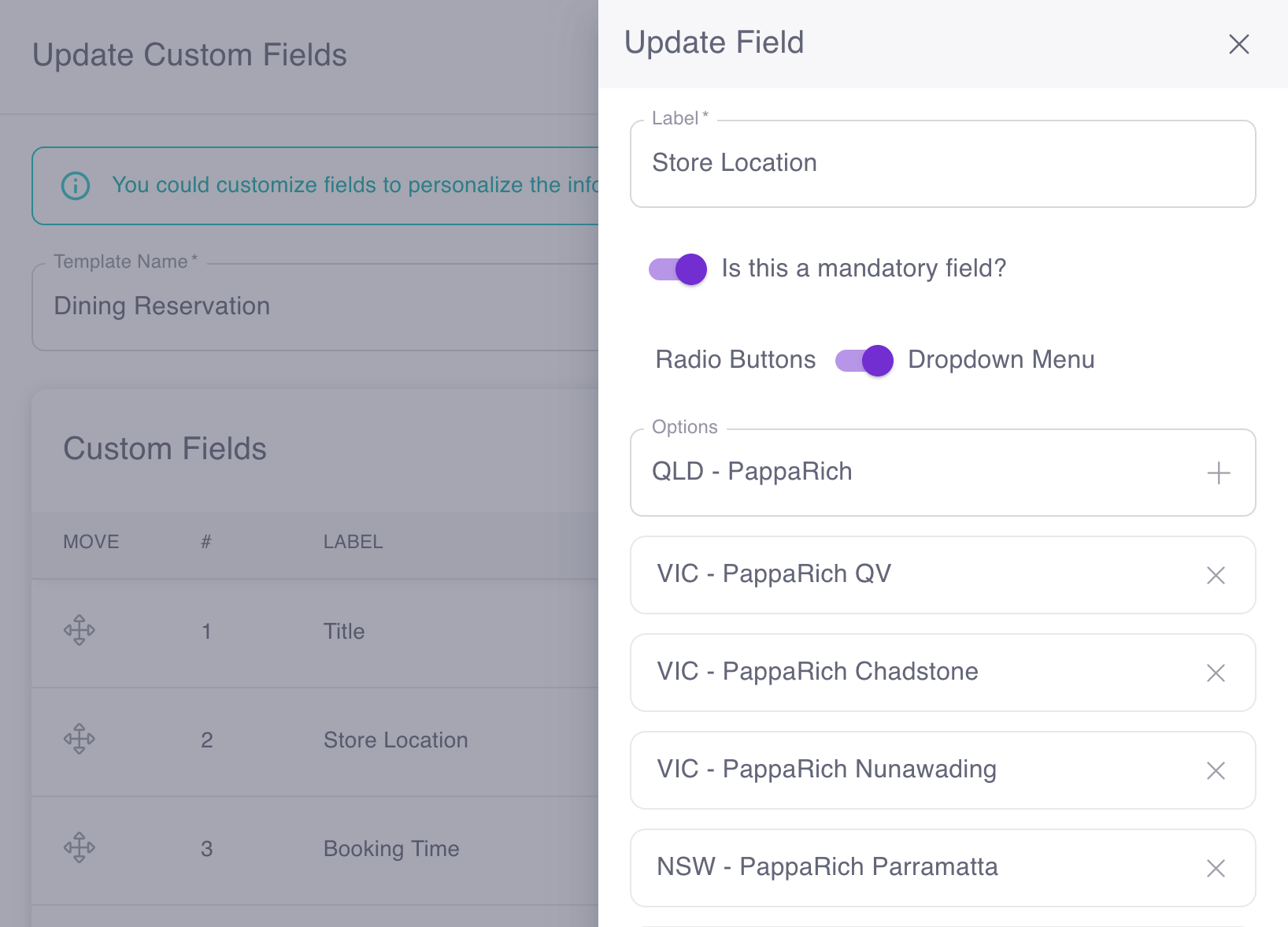
Navigate to the Templates page and add a "Single Choice" field labeled "Event Location" or "Venue Selection." This critical field allows attendees to choose which venue they'll attend during registration. Configure the field with your specific locations:
- For conference tours: "New York - April 15", "Chicago - April 22", "Los Angeles - April 29"
- For multi-venue festivals: "Main Stage", "Acoustic Stage", "Dance Tent", "Food Court Area"
- For corporate training: "Seattle Office", "Boston Office", "Austin Office", "Denver Office"
- For recurring workshops: "Downtown Community Center", "Westside Library", "Northgate Coworking Space"
This location field becomes the key filter for all attendance tracking and reporting—allowing you to see registration counts and check-in rates by venue.
Step 3: Customize Additional Registration Fields
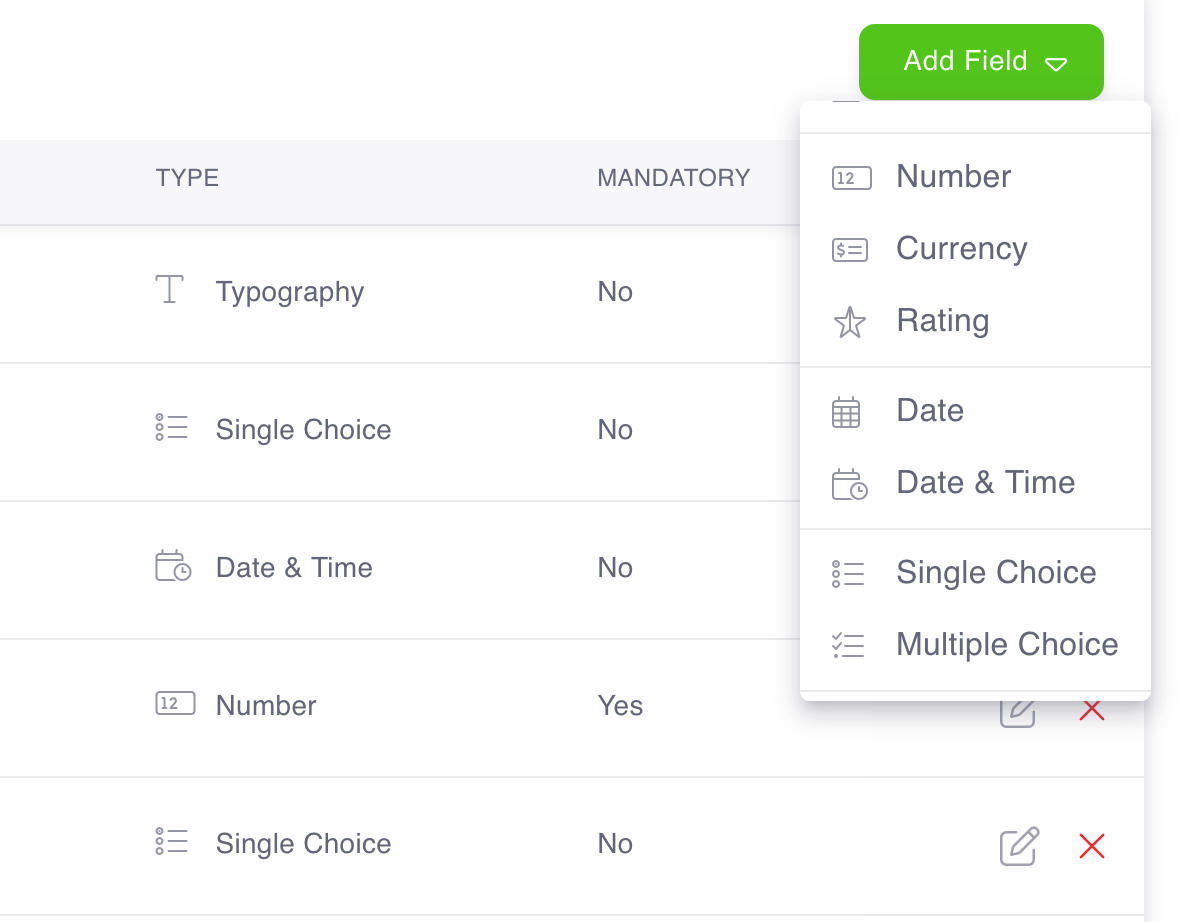
Add other relevant fields to capture the information you need from attendees across all locations. Common fields for multi-location event registration include:
- Full Name (first and last name)
- Email Address (for QR code ticket delivery)
- Phone Number (for SMS/WhatsApp ticket delivery)
- Company/Organization (for professional events)
- Ticket Type (VIP, General Admission, Student, etc.)
- Session Preferences (for multi-track events)
- Dietary Restrictions or Special Needs
Keep registration forms concise—you can collect additional information at check-in if needed. The key is making location selection prominent so attendees don't register for the wrong venue.
Step 4: Generate Your Event Registration QR Code
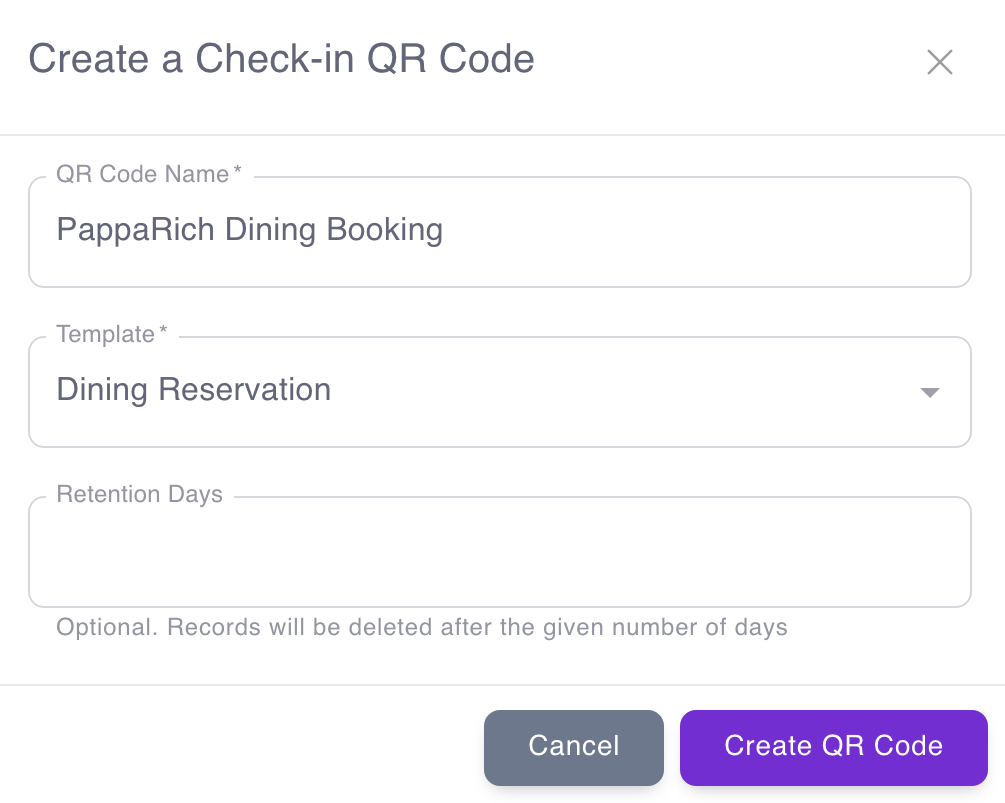
Navigate to the "QR Codes" page and create a new QR code linked to your multi-location registration form. When attendees scan this master QR code, they see the registration form with location selection, complete it, and receive their unique attendance QR code. You can create one master QR code for all locations, or create location-specific QR codes if you're promoting different venues through different channels (e.g., a QR code on flyers in New York that defaults to "New York" as the location, another on flyers in Chicago that defaults to "Chicago").
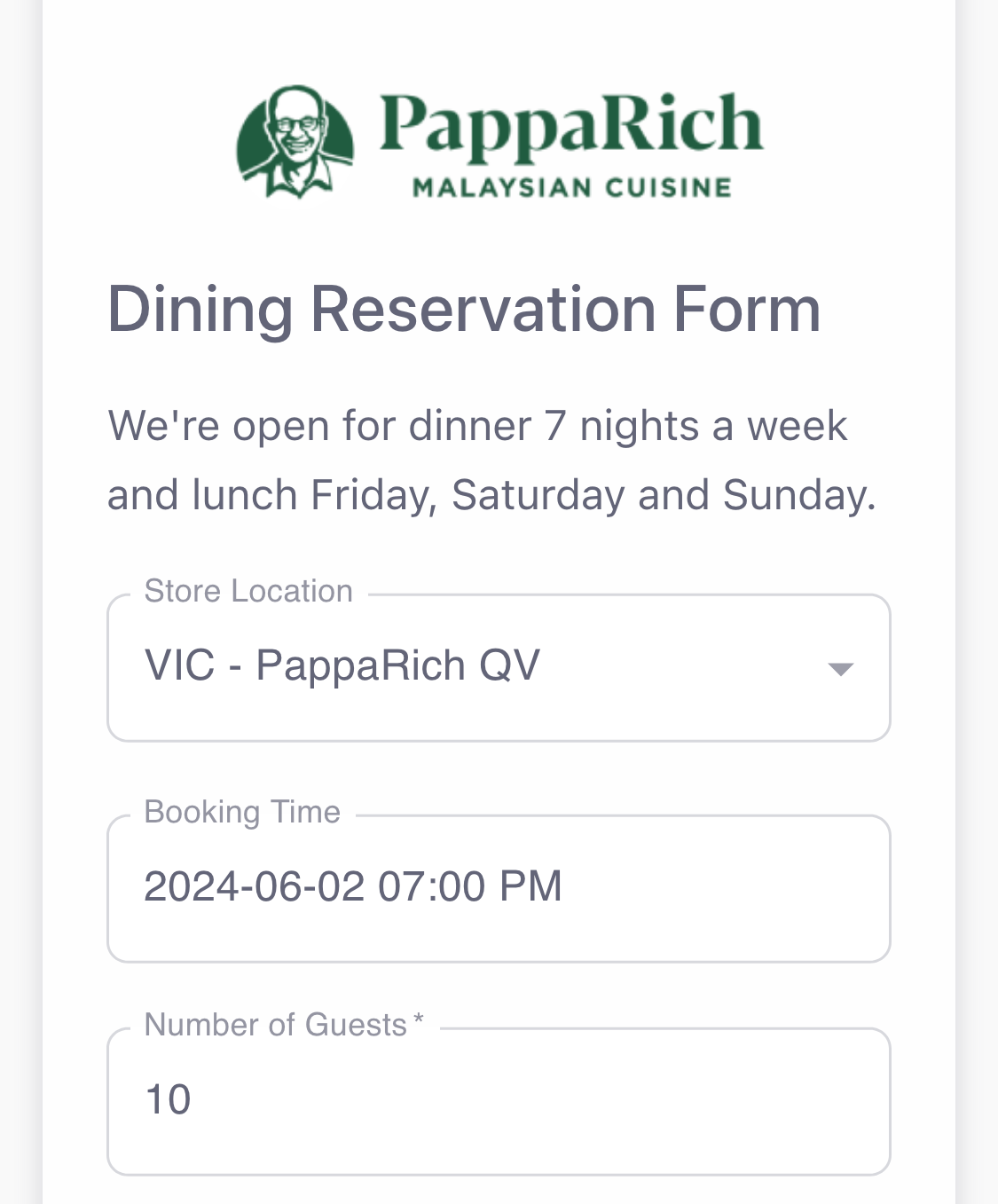
Step 5: Attendees Register and Select Their Location
When attendees scan your event QR code or access your registration link, they see the form with all locations listed. They select their preferred venue, complete the remaining fields, and submit. The system instantly generates their unique attendance QR code and sends it via email or WhatsApp. That QR code is what they'll scan at check-in at their selected location. The location they chose is embedded in their registration record and QR code, so check-in staff can verify attendees are at the correct venue.
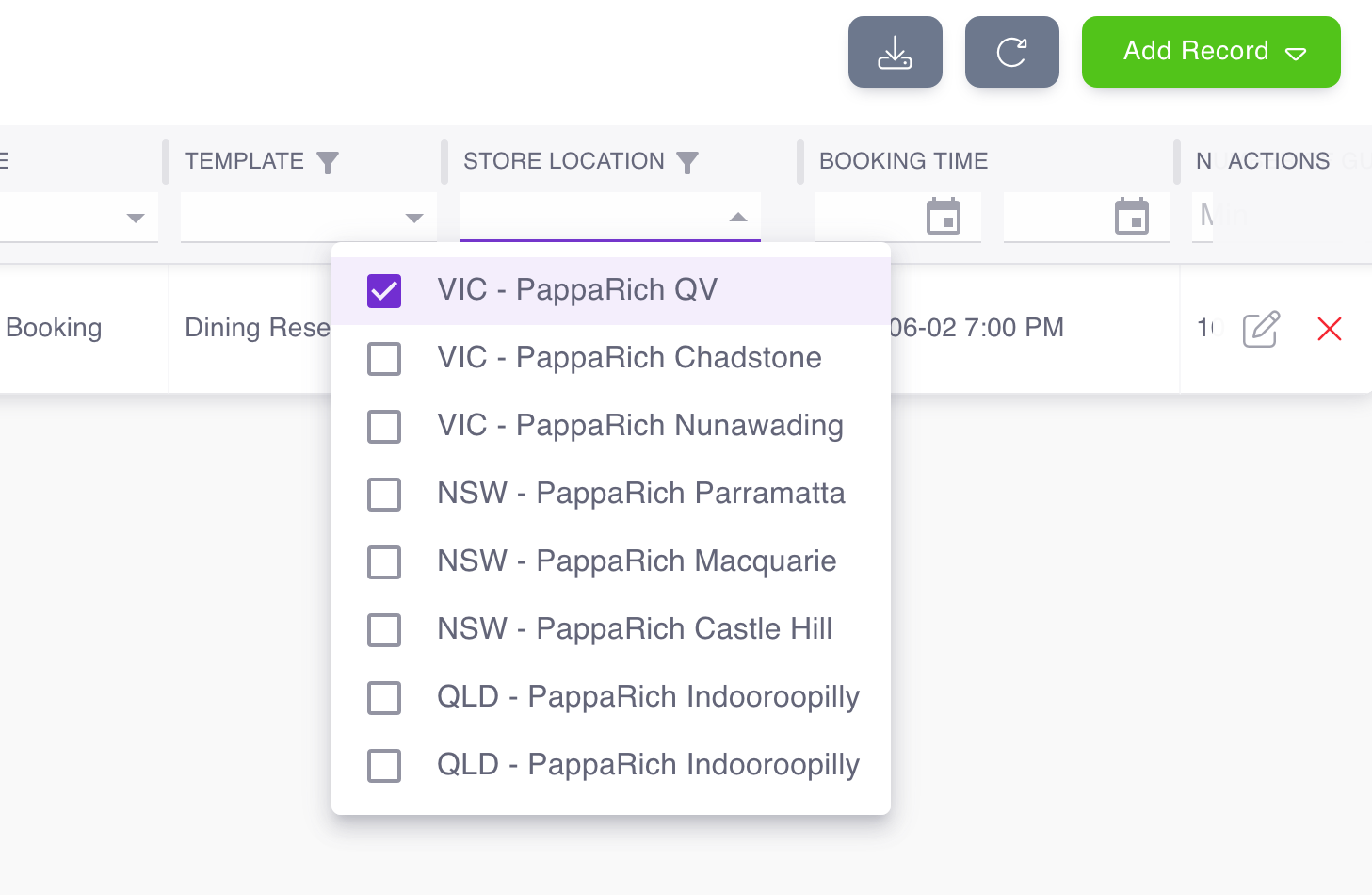
Step 6: Track Attendance and Export Reports by Location
Navigate to the "Records" page to view all event registrations with location filtering. See total registrations by venue, check-in rates for each location, and which venues are most popular. Export location-specific attendance records as CSV files for post-event analysis. This location-based tracking answers critical questions: Which venue had the highest attendance? Did the Chicago event outperform the New York event? Which location had the most no-shows? Should you allocate more resources to certain venues for future events?
Benefits of Centralized Multi-Location Event Management
One Registration System for All Venues
Instead of running separate registration systems for each location (or worse, separate ticketing platforms), manage everything from one event ticketing platform. Update registration forms, add new locations, or close registration for specific venues—all from a single dashboard. This centralization saves hours of duplicate setup work and reduces the chance of inconsistencies between locations.
Location-Specific Attendance Tracking and Reporting
Track registrations and check-ins separately for each venue. See real-time attendance counts by location during your events. Export location-specific reports for venue capacity planning, catering estimates, staffing decisions, and ROI analysis. Compare performance across locations to optimize future event planning (e.g., "Our West Coast events consistently fill up faster than East Coast—we should allocate more marketing budget there").
Consistent Branding Across All Locations
Your event branding, registration forms, email confirmations, and QR code tickets look identical across all venues. Whether an attendee registers for your Seattle workshop or your Miami workshop, they get the same professional experience. This consistency reinforces your brand and reduces confusion ("Wait, is this the same company? Why do these tickets look different?").
No Per-Ticket Fees for Multi-Location Events
Traditional event ticketing platforms charge per ticket (2-5% plus fees), which multiplies across locations. Running a conference tour in 5 cities with 200 attendees each = 1,000 tickets at 3% = $30-150 in fees depending on ticket prices. QR Sage's flat $10/month pricing covers unlimited tickets across unlimited locations. Run events in 2 cities or 20 cities—the price stays the same.
Ready to simplify multi-location event management? QR Sage has powered over 2,000 events and issued more than 23,000 QR code tickets—including conference tours, multi-venue festivals, and event series across dozens of locations. Whether you're running the same event in 3 cities or managing a festival with 10 different stages, the platform handles location-based registration and check-in effortlessly.
Get started free—no credit card required. Create your first multi-location event in under 10 minutes. Unlimited venues, unlimited tickets, unlimited locations—all for $10/month. Set up location selection, customize registration forms, and start tracking attendance by venue immediately.